TL;DR
- ChatGPT can do far more than write blog posts — it can write the short description Google shows for your website in search results, describe your images for visually impaired visitors, translate your content into other languages, and draft customer email replies.
- Each use case takes minutes, not hours, and most require zero technical knowledge — just copy-paste the right prompt.
- ChatGPT is a tool, not a replacement for your judgment — always review its output before publishing.
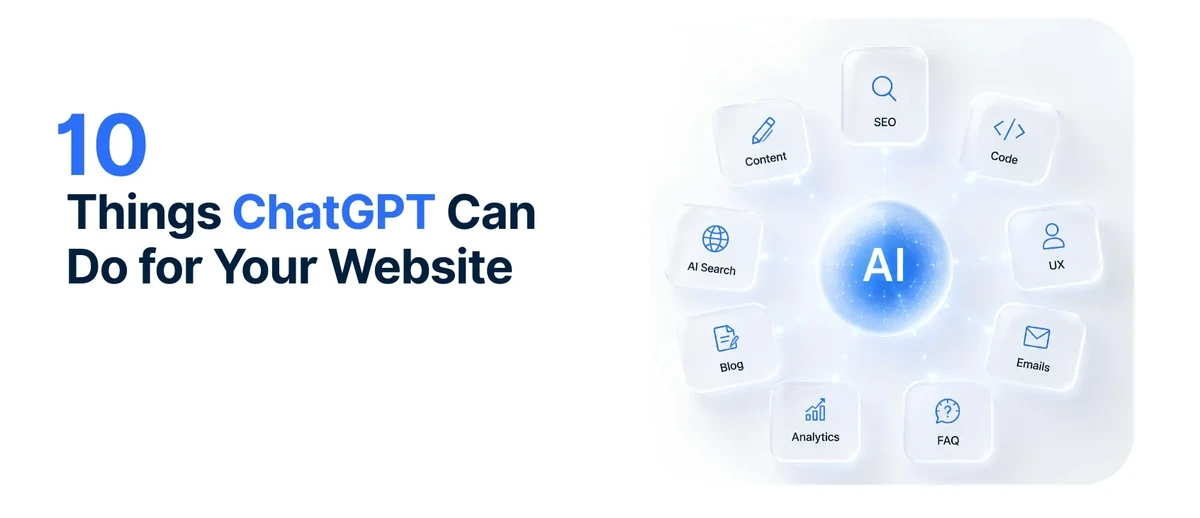
- Here are 10 practical things you can do today, with copy-paste prompts for each.
You’re Probably Using 5% of What ChatGPT Can Do
You’ve used ChatGPT to write an email or brainstorm ideas. But did you know it can write the short description Google shows for your website in search results? Or describe your images for visually impaired visitors? Or translate your entire website into Spanish? Most people use ChatGPT for about 5% of what it can actually do for their website. Here are the other 95%.
1. Write Your Website Content (About, Services, Homepage)
What it is. Full first drafts of every page on your website — your About page, your service descriptions, your homepage headline.
Why it matters. Writing is the number one bottleneck in website projects. Most people stare at a blank page for days, then write something vague just to be done with it. ChatGPT eliminates the blank page. You go from “I don’t know what to say” to “I need to fix this” — and fixing is ten times easier than starting from scratch.
Copy-paste prompt:
“Write a first draft of the About page for my website. My business is [business type] in [city]. We’ve been open since [year]. What makes us different is [1-2 sentences about what sets you apart]. The tone should be [warm and friendly / professional and straightforward / casual]. Keep it under 300 words.”
Honest caveat. Always edit for accuracy and tone. ChatGPT writes first drafts, not final drafts. It doesn’t know what you do — it fills gaps with generic phrases. Replace those with specifics only you know.
Related: How to Use ChatGPT to Write Your Website Content — full prompt templates for every page on your site.
2. Write the Description Google Shows for Your Website
What it is. The 150-character description that appears under your website’s link in Google search results — the thing that decides whether people click your link or your competitor’s.
Why it matters. Most websites leave this blank or let Google guess. Google’s guesses are usually bad — it pulls random text from your page that may have nothing to do with what you offer. A well-written description means more people click your link, which means more visitors, which means more customers.
Copy-paste prompt:
“Write a 150-character meta description for my [page name] page. My business is [business type] in [city]. The page is about [topic]. Make it compelling enough to make someone click, but don’t use clickbait. Include [main keyword] if it fits naturally.”
Honest caveat. Keep it under 160 characters or Google cuts it off with an ellipsis. ChatGPT sometimes writes longer than you asked — tell it the exact character limit and check the result yourself.
Related: Why Your Website Isn’t on Google — missing page descriptions are reason #5 your site doesn’t show up in search.
3. Describe Your Images for Visitors Who Can’t See Them
What it is. Short text descriptions of your images that screen-reading software reads aloud to visually impaired visitors. These descriptions also help Google understand what your images show.
Why it matters. If your images have no text descriptions, visually impaired visitors can’t access half your website — and Google can’t tell what your photos show. Most websites leave this blank because writing descriptions for every image is tedious. ChatGPT makes it a 30-second task per image.
Copy-paste prompt:
“Write alt text (under 125 characters) for this image: [describe what the image shows, e.g., ‘a plumber fixing a kitchen sink under a cabinet’]. The image is on a page about [topic] for my [business type] business. Describe what’s literally in the image, not what it represents.”
Honest caveat. Don’t add text descriptions to decorative images like background patterns — they don’t need them. If you’re unsure which images need descriptions and which don’t, ask ChatGPT to help you sort them.
4. Translate Your Website Content
What it is. Translate your English pages into Spanish, German, Russian, or any other language.
Why it matters. Reaching people in their native language builds trust and increases inquiries. Professional translation is expensive — often several hundred euros for a small website. ChatGPT is free and surprisingly good for everyday website copy.
Copy-paste prompt:
“Translate the following website text from English to [language]. Keep the tone [warm / professional / casual]. This is for a [business type] website targeting [country/region] speakers. [Paste text]”
Honest caveat. AI translation is good but not perfect. For legal pages like your privacy policy or terms of service, use a professional translator — errors in legal text can create real liability. For marketing copy and service descriptions, AI plus a quick review by a native speaker is usually sufficient.
5. Write FAQ Sections
What it is. A list of common questions and answers for your website.
Why it matters. FAQs answer customer objections before they ever contact you — which saves your time and filters out people who weren’t going to hire you anyway. They also give Google more text to match to searches, which helps you appear in more search results.
Copy-paste prompt:
“Write 5 frequently asked questions for my [business type] website in [city]. I serve [target customer]. Common questions I hear are [list 3-5 real questions]. Write each question and a 2-3 sentence answer in a [tone] voice.”
Honest caveat. Use real questions you’ve actually heard from customers, not questions ChatGPT invents. The best FAQs come from real customer interactions. If ChatGPT generates a question you’ve never been asked, delete it — it’s not useful to your visitors.
6. Suggest Domain Names
What it is. Brainstorm available domain names for your website.
Why it matters. A good domain is short, memorable, and easy to spell over the phone. Finding one that’s available is surprisingly frustrating — the obvious ones are almost always taken. ChatGPT can generate 10 or 20 ideas in seconds, including creative options you might not think of.
Copy-paste prompt:
“Suggest 10 domain names for my business. My business name is [name]. I’m a [business type] in [city]. The domain should be: short, memorable, easy to spell over the phone, and ideally .com. Avoid hyphens and numbers.”
Honest caveat. ChatGPT can’t check if domains are actually available — it only suggests names. Use a registrar like Namecheap or GoDaddy to verify availability before you get attached to a name.
7. Draft Email Replies to Customer Inquiries
What it is. Professional email responses to common customer questions about pricing, availability, and service details.
Why it matters. How fast and how well you reply to an inquiry often determines whether that person becomes a customer or moves on to the next option on their list. ChatGPT helps you reply faster and more professionally than typing every response from scratch.
Copy-paste prompt:
“Draft a professional email reply to this customer inquiry: [paste inquiry]. My business is [type] in [city]. The key information to include is [pricing / availability / next steps]. Keep it friendly but professional, under 150 words.”
Honest caveat. Always personalize the reply — don’t send a template that could have come from anyone. Add the customer’s name, reference their specific question, and adjust the tone to match how they wrote to you.
8. Turn Your Website Content Into Social Media Posts
What it is. Take a service description from your website and turn it into social media posts for Facebook, Instagram, and LinkedIn.
Why it matters. Maintaining a social presence is time-consuming, and most people give up after a few weeks. Repurposing content you’ve already written gives you consistent posts without writing from scratch every time.
Copy-paste prompt:
“Turn this service description into 3 social media posts — one for Facebook, one for Instagram, one for LinkedIn: [paste service description]. My business is [type] in [city]. Each post should be under 200 characters and include a call to action.”
Honest caveat. Don’t post identical content on every platform — each one has a different audience and tone. The prompt asks for platform-specific variations, but review them to make sure they feel right for each platform.
9. Rewrite Your Service Descriptions to Focus on Benefits
What it is. Take a generic service description and rewrite it to focus on what the customer gets, not just what the service is.
Why it matters. Most service descriptions say what the service IS: “We offer plumbing repair services.” They don’t say what the customer GETS: “We fix your plumbing fast so you can stop worrying about water damage.” The second version connects with people. ChatGPT can help you reframe every service this way.
Copy-paste prompt:
“I offer [service name] for [target customer] in [city]. Most businesses describe this service as [your current generic description]. Help me write 3 alternative descriptions that focus on what the customer gets — the benefit — not just what the service is. Use plain English, no jargon.”
Honest caveat. The best descriptions come from understanding your customers’ actual pain points. Feed ChatGPT real customer questions and complaints for better output. Generic input produces generic output — even with AI.
10. Create Blog Post Outlines
What it is. Detailed outlines for blog posts you want to write for your website.
Why it matters. Starting is the hardest part of writing. An outline gives you a structure to fill in, which is far easier than facing a blank page. With a good outline, you can write a full post in an hour instead of spending three hours organizing your thoughts.
Copy-paste prompt:
“Create a detailed blog post outline for the topic ‘[topic]’ targeted at [audience]. The post should be [length] words. Include: a compelling title, 5-7 main sections with subheadings, key points for each section, and a call to action. My business is [type] and the goal is to [attract customers / educate / build trust].”
Honest caveat. Use the outline as a starting point, not a constraint. If a section doesn’t fit what you do, cut it. If you think of something ChatGPT missed, add it. The outline is a scaffold — you’re the one who fills it with real expertise.
The Honest Limits of ChatGPT for Websites
ChatGPT is a writing assistant, not a website builder. It can’t design pages, write code, set up hosting, or optimize images. It writes text — very well, but only text. If you need a website built, ChatGPT can help you write the content, but someone still needs to put that content into an actual website.
ChatGPT doesn’t know what you do. It can write generic content about “plumbers” — but only you know that you’re the only plumber in South Austin who answers calls at 2am, or that you guarantee your work for two years when everyone else offers one. The specifics that make people choose you? Those come from you, not from AI.
ChatGPT can be wrong. It sometimes states incorrect facts with total confidence — things like made-up statistics, wrong dates, or advice that sounds logical but doesn’t hold up. Never publish AI-generated content without verifying the facts, especially numbers and claims about your field.
ChatGPT doesn’t replace expertise. For SEO strategy, accessibility audits, performance optimization, and security — you need a professional. ChatGPT can write text about these topics, but it can’t implement them. Knowing the right words is not the same as doing the work.
The 30-Second ChatGPT Readiness Check
Before you start, answer these five questions:
- I know what pages my website needs and what each one should say
- I have real customer questions and feedback I can feed to ChatGPT
- I’m willing to edit every piece of AI output before publishing it
- I understand ChatGPT writes text, not websites — I still need a site
- I know which tasks to keep for myself (legal pages, factual claims) vs. delegate to AI
If you checked “no” on two or more, start with items 1 and 2 from the list above — writing your content and page descriptions. Those give you the biggest payoff with the lowest risk.
FAQ
Is ChatGPT free to use?
The free version of ChatGPT (using GPT-4o mini) handles all 10 tasks in this post. ChatGPT Plus costs $20/month and gives you access to more powerful models and features, but for website content tasks, the free version is sufficient. You don’t need to pay for AI to write your website content.
Can ChatGPT build my website?
No. ChatGPT writes text — it doesn’t design pages, write production code, configure hosting, or set up domains. It can write content for your pages and suggest ideas, but you (or a developer) still need to put that content into an actual website. Think of ChatGPT as your copywriter, not your web developer.
Will using ChatGPT hurt my Google rankings?
Not if you edit the output. Google’s guidance is to create helpful, people-first content — they don’t penalize AI-assisted content. They do penalize low-quality, generic, unedited content. If you use ChatGPT to write a first draft and then edit it to be specific, accurate, and useful, your search rankings are fine. If you copy-paste raw AI output, it probably won’t rank — because it’s generic, not because it’s AI. Read more about why websites don’t show up on Google →
What’s the difference between ChatGPT and Google AI or Gemini?
They’re different AI tools made by different companies (OpenAI vs. Google). For website content tasks, they’re roughly comparable — both can write content, translate, and brainstorm. ChatGPT is more widely used and has a larger ecosystem of tutorials and guides. Use whichever you’re comfortable with. The prompts in this post work with either tool.
Bottom Line
ChatGPT is a Swiss Army knife for your website — it writes, translates, describes, brainstorms, and drafts. But it’s a tool, not a team: the final quality depends on the person editing, not the AI generating. Use it to start faster, but never publish what you haven’t reviewed.
Want your website optimized for both human visitors and AI tools? Our AI Optimization service makes your site easy for AI to find, read, and recommend. Or if you need a website that’s ready for all 10 of these use cases — get a quote →