TL;DR
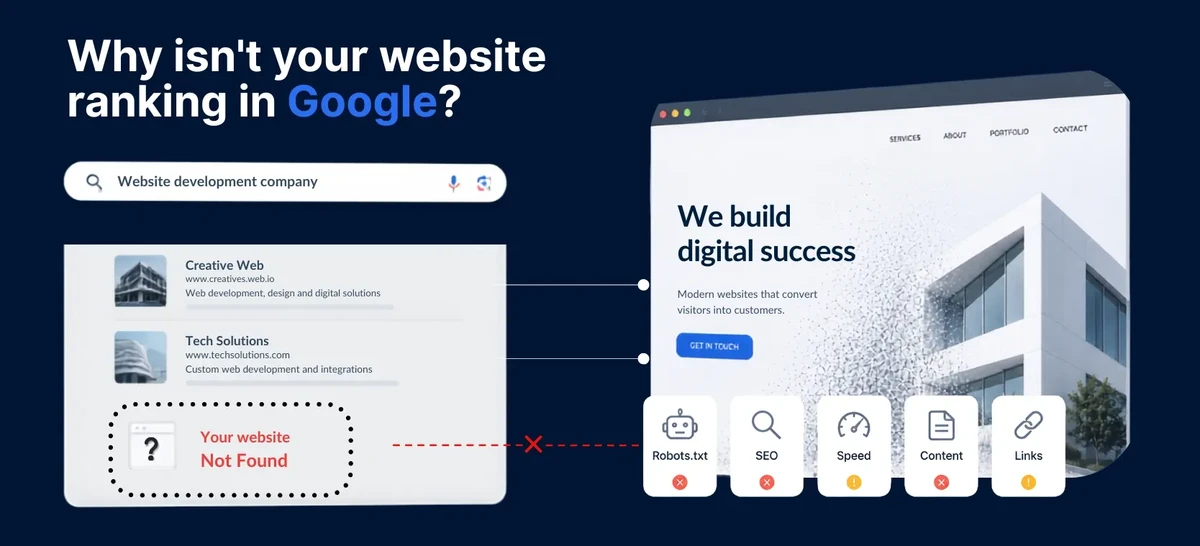
- Google doesn’t hate your website — it either doesn’t know it exists, or something is blocking it from appearing in search results.
- The 7 most common reasons: your site is too new, you haven’t told Google about it, something is telling Google to stay away, your content is too thin, your site is too slow, your page titles and descriptions are missing, and no other websites link to yours.
- Most of these are fixable in an afternoon, even if you’re not technical.
- SEO is not instant — even after you fix everything, it takes weeks for Google to re-evaluate your site and move it up.
The Moment Everyone Knows
You launched your website. You told your friends. You posted the link on Instagram. Then you typed your name into Google, scrolled through page after page, and… nothing. You’re on page 4. Or page 9. Or nowhere at all. Meanwhile, your competitor with the ugly website from 2014 is sitting comfortably at the top of page 1. What gives?
The Good News First
Google isn’t ignoring you on purpose. When someone searches, Google’s system evaluates hundreds of clues about every website it knows about — how fast it loads, what words are on the page, how many other sites link to it, whether it works on a phone — and then ranks the ones that best match the search. If your site is missing key clues, it simply doesn’t rank. Not because Google dislikes you, but because it doesn’t have enough information to trust you yet.
This is fixable. Almost every case of “my website isn’t on Google” comes down to one of seven common issues. Let’s walk through each one — what it is, how to check if you have it, and exactly how to fix it.
1. Google hasn’t found your site yet
What this means. Google discovers new websites by following links from other websites, or by direct submission. If your site is brand new and no other site links to it, Google may not know it exists. Without intervention, it can take weeks or even months for Google to stumble across your site naturally.
How to check. Go to Google and search site:yourdomain.com (replace “yourdomain.com” with your actual domain). If you see zero results, Google hasn’t added your site to its index — the collection of pages it searches through when someone types a query.
How to fix it. Sign up for Google Search Console — it’s free, and it’s Google’s official tool for website owners. Add your site, verify ownership (Google gives you simple step-by-step instructions), and submit your sitemap. A sitemap is a file that lists all your pages so Google can find them easily. Think of it as handing Google a map to your site instead of hoping it wanders by. After submission, most sites are indexed within days, not months.
2. You’re accidentally telling Google to stay away
What this means. There’s a setting called noindex that tells search engines “don’t show this page in search results.” It’s commonly turned on during development so that half-finished pages don’t appear on Google. The problem? People forget to turn it off when the site goes live. If you’re on WordPress, this setting hides under Settings → Reading, labeled “Discourage search engines from indexing this site” — and it’s checked by default on new installs.
How to check. Search site:yourdomain.com on Google. If only some of your pages show up, or none do, this could be why. Also check your robots.txt file — a small file at yourdomain.com/robots.txt that tells search engines what they’re allowed to look at on your site. If it says Disallow: /, that means “don’t look at anything,” which is the opposite of what you want.
How to fix it. Turn off the “discourage search engines” setting in WordPress (or your platform’s equivalent). Remove any noindex tags from your pages. Check that robots.txt isn’t blocking important pages. Once you’ve made changes, go back to Google Search Console and request re-indexing. Google will revisit your site and see that it’s now open for visitors.
3. Your site loads too slowly
What this means. Google uses page speed as one of its ranking factors — if your site takes five or more seconds to load, Google pushes it down in search results because it provides a poor experience for the person searching. Slow sites also have higher bounce rates: people leave before the page finishes loading, which tells Google the site isn’t helpful.
How to check. Go to PageSpeed Insights (pagespeed.web.dev — it’s Google’s own free tool) and type in your URL. If your score is under 50, speed is likely hurting your rankings. The tool also tells you exactly what’s slowing your site down.
How to fix it. This is where the way your site is built matters a lot. Heavy WordPress sites with dozens of plugins are inherently slow — every plugin adds code that loads for every visitor, whether they use that feature or not. Sites built without a heavy system underneath can load in under a second because there’s no database, no plugins, no server processing — just files delivered instantly.
Related: Why Your Website Doesn’t Need to Be Complicated — why simpler sites are faster, cheaper, and rank better.
Related: Free Website Hosting: What’s the Catch? — how free hosting platforms throttle your speed and hurt your search rankings.
4. Your content is too thin or too generic
What this means. Google reads the text on your website to understand what you do and when to show it in search results. If your homepage says “Welcome to our company — quality service at affordable prices,” that tells Google nothing about what you actually do. If every page has only 100–200 words of vague, generic text, Google can’t match your site to any specific search. It would rather show a competitor’s page that clearly says “emergency plumbing repair in Austin, Texas” than your page that says “we provide quality services.”
How to check. Read each page of your site honestly. Does it clearly say what you do, who you help, and where you’re located? If a stranger couldn’t figure out your services from the text alone, Google can’t either.
How to fix it. Write specific, useful content for every page. Each service page should explain what the service is, who it’s for, and why someone should choose you. If you serve a local area, include your city or region — “plumber in Austin” is far more useful to Google than “quality plumbing services.” Aim for at least 300–500 words per service page. Google rewards content that genuinely helps the reader, not keyword-stuffed filler that repeats the same phrase ten times.
5. Your page titles and descriptions are missing
What this means. Every page on your website has two behind-the-scenes labels that Google uses in search results: a title tag — the blue clickable link in Google results — and a meta description, the gray text below it that summarizes what the page is about. If these are missing or left as defaults, Google guesses what to show. And it usually guesses badly. A page titled “Home” or “Untitled” will never rank for anything useful, and a missing description means Google pulls random text from your page that may have nothing to do with what you offer.
How to check. Search site:yourdomain.com on Google and look at how your pages appear. Are the titles meaningful and descriptive? Are the summaries helpful? Or do you see “Home,” “About,” or random snippets of text that don’t represent what you do?
How to fix it. Give every page a unique, descriptive title — about 50–60 characters — that includes what you do and where. Instead of “Home,” use something like “Sunrise Plumbing — Emergency Plumber in Austin, TX.” Then write a meta description — about 120–160 characters — that summarizes the page in a way that makes someone want to click. Most website builders and content platforms let you set these without touching code. If you’re on Wix or Squarespace, look for the SEO settings panel in their page editor.
Related: Wix vs Squarespace vs Hiring a Developer — how DIY builders limit your control over search visibility.
6. No other websites link to yours
What this means. Links from other websites to yours — called backlinks — are one of Google’s most important ranking factors. Think of each link as a vote of confidence. If your site has no inbound links, Google has no independent signal that your site is trustworthy or important. It’s like being a restaurant with no reviews — Google has no reason to recommend you over competitors who do have links.
How to check. This is hard to measure precisely without paid tools, but you can get a rough picture. Search link:yourdomain.com on Google, or open the “External links” report in Google Search Console (free). If you see zero or just a handful of links, this is holding you back.
How to fix it. Start with easy wins that cost nothing. List your site on Google Business Profile (free), Bing Places (free), Yelp, and any industry-specific directories. Join your local chamber of commerce and get listed on their site. Ask partners, suppliers, or happy clients to link to your site from theirs. Set up profiles on Facebook, LinkedIn, and Instagram — all of these count as links. You don’t need hundreds. For a local site, 10–20 quality links from real websites can make a meaningful difference in where you rank.
This is off-site SEO — work that happens away from your website, like getting listed on directories and asking partners for links. It’s something you handle yourself, not something a web developer does for you. Most listings above are free and take just minutes each.
7. Your site isn’t mobile-friendly
What this means. Over 60% of all web traffic comes from phones. Google uses mobile-first indexing — meaning it looks at the phone version of your site first when deciding where to rank you. If your site is hard to read on a phone — text too small, buttons too close together, horizontal scrolling, elements that overlap — Google drops it in mobile search results. Since most people search on their phones, that means most of your potential visitors will never see you.
How to check. Open your website on your phone. Can you read everything without zooming? Are buttons easy to tap with your thumb? Is there any horizontal scrolling? You can also run Google’s Mobile-Friendly Test — search for it, it’s free and takes 10 seconds.
How to fix it. If your site isn’t mobile-friendly, this is usually a design issue that needs a rebuild. Modern websites are built mobile-first — designed for phones first, then adapted for larger screens. If your site was built before 2020, there’s a good chance it doesn’t meet current mobile standards. A site that looks fine on a laptop but falls apart on a phone is actively hurting your search rankings every day.
The 60-Second Self-Check
Before you do anything else, answer these five questions:
- I’ve submitted my site to Google Search Console
- My site appears when I search
site:mydomain.comon Google - Each page has a unique, descriptive title (not “Home” or “About”)
- My site loads in under 3 seconds (test at pagespeed.web.dev)
- My site is readable and usable on my phone
If you checked “no” on two or more, your website has fixable issues that are keeping it off Google. The good news: you now know exactly what they are.
FAQ
How long does it take for Google to find my website?
If you submit your site through Google Search Console, Google typically crawls it within a few days. Without submission, it can take weeks or months — Google has to find a link to your site from somewhere else on the internet. Submitting is free and takes about five minutes. There is no reason to wait.
Can I pay Google to put my website at the top?
You can pay for Google Ads — the sponsored results that appear at the very top of the page, labeled “Sponsored.” But those are separate from organic results (the real results below the ads). Ads stop the moment you stop paying. Organic rankings can’t be bought — they’re earned through the factors in this article. A smart strategy uses both: ads for immediate visibility while you build organic rankings for long-term, free traffic.
Why is my competitor ranking above me when their website looks worse?
“Looks worse” and “ranks better” aren’t contradictory. Google doesn’t judge visual design — it evaluates factors like page speed, content relevance, backlinks, how long the domain has existed, and mobile usability. Your competitor might have been online longer, have more websites linking to theirs, or have content that more precisely matches what people search for. The good news: every one of these factors is something you can catch up on.
Do I need to hire someone to fix my SEO, or can I do it myself?
The on-site parts — site speed, page structure, meta tags, mobile design, submitting to Google — are what a web developer handles when building your site. The off-site parts — getting other websites to link to yours through directory listings, partnerships, and profiles — are things you handle yourself. Some listings are free, others charge a fee. If your site has issues with speed, structure, or mobile design, that’s what we help with →
Bottom Line
Your website not showing up on Google is almost never a mystery — it’s a checklist. Fix the seven things above — some yourself, some with help — tell Google your site exists, be patient, and the results will come. SEO isn’t instant, but it is reliable: every improvement you make is a permanent asset that keeps working for you for years.
If your website struggles with speed, mobile design, page structure, or search setup — that’s exactly what we build →